Your profile
Complete your personal details so wills and other generated documents fill in correctly.
Your profile is not just decoration. DigiWish and the other documents BlockWill generates pull your legal name, date of birth, nationality and country of residence straight from it, so an incomplete profile produces an incomplete will.
What to fill in
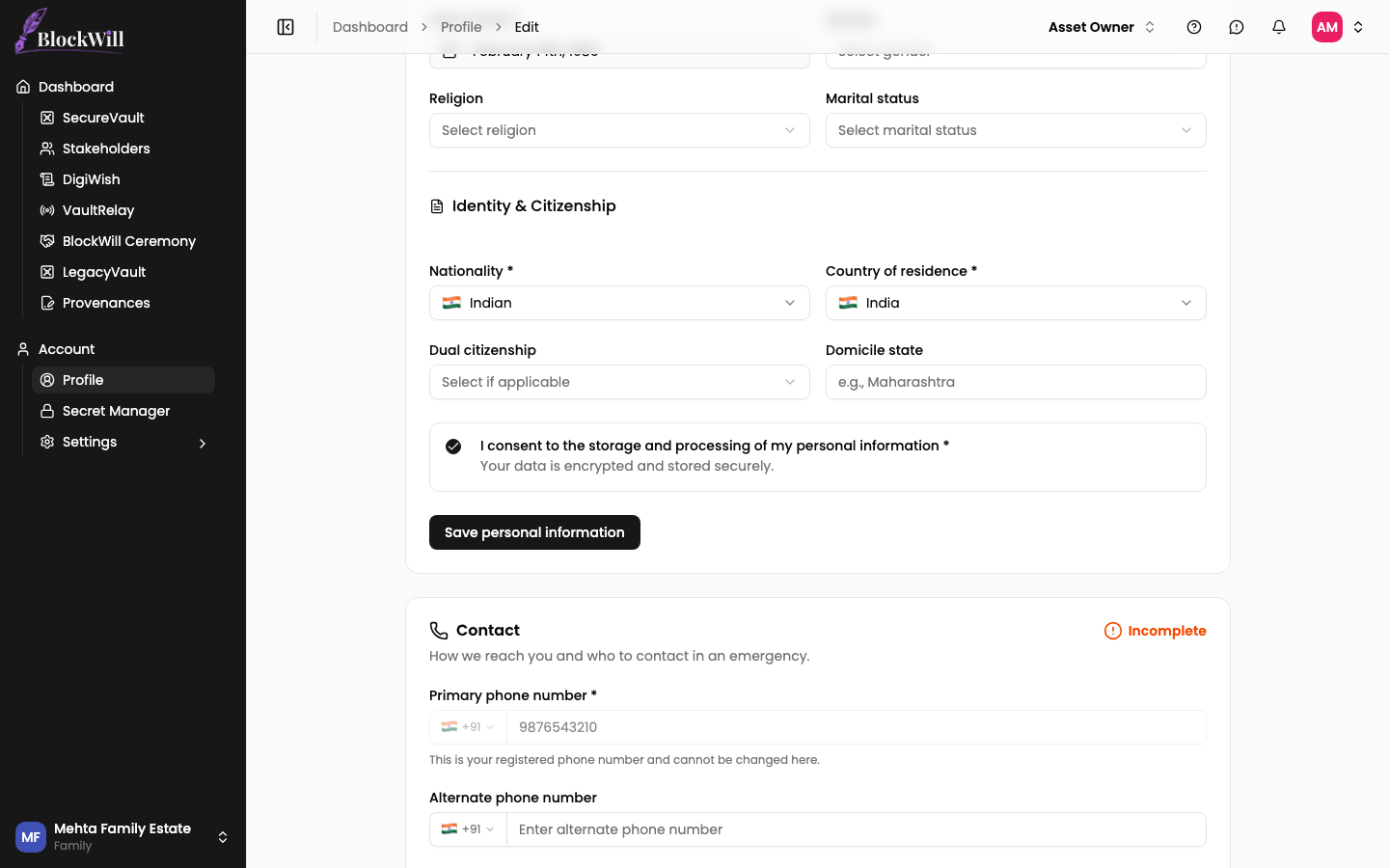
The profile editor is split into sections, each with its own Incomplete or Completed badge and its own save button. Saving one section does not save the others.
Open Profile in the sidebar, then Edit.
Under Personal information, enter your Full name exactly as it appears on your legal documents, and pick your Date of birth.
Under Identity & Citizenship, set your Nationality and Country of residence. Both are required. Add a dual citizenship or domicile state if they apply to you.
Leave the consent checkbox ticked and click Save personal information. The section badge flips from Incomplete to Completed.
Contact details
The Contact section holds how BlockWill reaches you. Your primary phone number is the one you verified at signup and cannot be changed here, but you can add an alternate number, choose a preferred contact method, and record an emergency contact.
Your permanent address and your mailing address are recorded separately, so post can reach you somewhere other than where you legally reside.